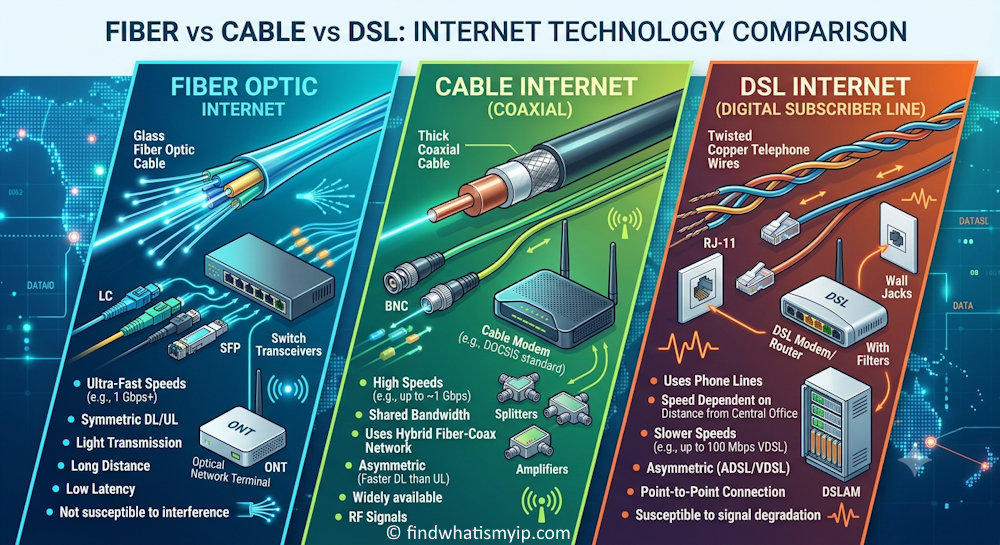
"Fiber," "cable" and "DSL" get thrown around like brand names, but they describe three genuinely different physical ways of getting internet into a building — and the physical difference is what drives everything else: how fast the connection can go, whether upload keeps up with download, whether your neighbors slow you down, and how far the provider's equipment can be from your house before things fall apart.
The physical difference
- DSL (Digital Subscriber Line) reuses the copper telephone wiring already run to most homes. It shares that copper with voice service and rides a separate frequency band.
- Cable reuses the coaxial cable originally run for cable TV, using the DOCSIS standard to carry internet alongside (or instead of) TV channels.
- Fiber is different in kind, not just degree: it sends pulses of light down a glass strand instead of an electrical signal down a metal wire. No electromagnetic interference, no signal loss from corrosion, and none of copper's distance penalty at residential scale.
Speed and upload — the biggest real-world gap
Top advertised download speeds can look similar between a fast cable plan and a fast fiber plan. The difference that actually changes daily life is upload: fiber connections are usually symmetric (upload close to or equal to download), while cable and DSL are asymmetric — download is the priority, and upload is a fraction of it. A "500 Mbps" cable plan might upload at only 20–35 Mbps; a "500 Mbps" fiber plan typically uploads at 500 Mbps too. That gap matters for video calls, uploading large files, cloud backup, live streaming, and anything that sends as much as it receives.
| DSL | Cable | Fiber | |
|---|---|---|---|
| Medium | Copper phone line | Coaxial cable | Glass fiber (light) |
| Typical download | 5–100 Mbps | 100 Mbps–1 Gbps+ | 300 Mbps–2 Gbps+ |
| Typical upload | 1–20 Mbps | 10–50 Mbps | Usually matches download |
| Distance sensitivity | High — degrades with distance from the provider | Low | Minimal at residential scale |
| Shared with neighbors? | No (dedicated line, but slow) | Yes — a local node | Minimal — high-capacity split |
| Latency | Moderate–high | Low–moderate | Lowest |
| Availability | Widest, including rural areas | Wide, urban/suburban | Narrowest, expanding |
Why cable slows down at 8 p.m. and DSL doesn't (but is slower to begin with)
Cable internet in a neighborhood shares bandwidth across everyone connected to the same local "node." When most households are streaming and gaming in the evening, that shared pool gets divided more ways and speeds visibly dip — the classic "my internet is slow at night" complaint. DSL doesn't have that specific problem, because each line runs its own dedicated path back to the provider, but it pays for that with a lower ceiling overall and a real distance penalty: the farther your home is from the provider's local equipment, the weaker and slower the copper signal gets. Fiber sidesteps both issues — light doesn't degrade meaningfully over residential distances, and the shared-capacity design (PON — passive optical network) has far more headroom than a cable node, so peak-hour slowdown is much less noticeable.
Latency: the number that matters more than the headline speed
For gaming, video calls, and anything interactive, latency (ping, in milliseconds) affects how responsive a connection feels more than raw download speed does. Fiber typically has the lowest latency, cable is a reasonable middle ground, and DSL tends to run higher, especially at longer loop distances. A 1 Gbps connection with high latency can still feel worse in a video call than a modest connection with low latency.
Why your speed test doesn't match your plan
This is the single most common complaint, and it's rarely the wire itself. In order of likelihood:
- Wi-Fi, not the connection. Distance from the router, walls, interference from other networks, and an overloaded 2.4 GHz band all cut real-world speed well below what arrives at the modem.
- Old hardware. A router or modem bought years ago may not be rated for your current plan's speed, especially after an upgrade.
- Too much else running. Background updates, other devices streaming or backing up, and cloud sync all eat into the number you see.
- Peak-hour congestion (cable specifically) — the shared-node effect above.
- Overselling. Some plans are provisioned assuming not everyone uses the full speed at once.
The fairest test: a device wired directly into the modem with a cable, with nothing else on the network active, using our Internet Speed Test. If that number is close to your plan, the connection is fine and the shortfall is happening on your side of the wall — usually Wi-Fi.
To actually isolate that, run the test wired, click Compare this result, then re-run it on Wi-Fi — the tool holds up to three runs side by side, with the faster of the two highlighted, so "is it my Wi-Fi or the connection itself" stops being a guess. The same panel is useful for a straight fiber-vs-cable-vs-DSL decision too: if you can test at a neighbor's or a friend's place on a different connection type, three runs in one comparison beats trying to remember numbers from different days.
Which one should you actually pick?
- Competitive gaming or heavy video calls / remote work: fiber if it's available — the low latency and symmetric upload are the point. Cable is a solid second choice.
- Streaming and browsing for a typical household: a mid-tier cable or fiber plan both comfortably cover it; the difference is mostly upload headroom and peak-hour consistency.
- Fiber isn't available yet: cable beats DSL on speed almost everywhere; DSL remains the fallback in rural or older areas neither cable nor fiber has reached.
- Uploading a lot (creators, cloud backup, security cameras, home servers): fiber's symmetric upload is the clearest practical win of the three.
Not sure what you're actually getting right now? Start with Internet Speed Test for real download, upload and latency numbers, and What Is My IP to confirm your connection details.
Frequently asked questions
Is fiber always faster than cable?
At advertised top speeds, fast cable and fast fiber plans can look similar on paper. The real difference shows up in upload speed (fiber is usually symmetric, cable is not) and consistency: cable bandwidth is shared with neighbors on the same node, so it slows down more at peak hours, while fiber's higher-capacity split keeps performance steady.
Why is DSL so much slower than cable or fiber?
DSL runs over copper telephone lines, and copper loses signal quality with distance. The further your home is from the provider's local equipment, the slower and less reliable the connection gets. Cable and fiber don't have that same distance penalty within a normal service area.
Why does my speed test not match the plan I'm paying for?
Most shortfalls happen after the signal reaches your home: Wi-Fi range and interference, an old router or modem not rated for your plan's speed, too many devices active at once, or (on cable) neighborhood congestion at peak hours. Testing on a device wired directly into the modem with nothing else running is the fairest comparison to what you're paying for.
Does the type of connection affect gaming or video calls?
Yes, more than raw download speed does. Latency (ping) and upload speed matter most for gaming and video calls. Fiber typically has the lowest latency and highest upload speed, cable is a reasonable middle ground, and DSL tends to be the weakest on both, especially at longer distances from the provider.
Should I switch to fiber if it becomes available at my address?
For most households, yes, if the price is comparable to your current plan. Symmetric upload, lower latency and no shared-node slowdown make fiber the more future-proof choice. It is less clear-cut if fiber costs significantly more and your current connection already comfortably covers what you actually do online.
Related reading: Do you still need a static IP address? · Comparing speed test results side by side · Tools: Internet Speed Test, What Is My IP, IP to Timezone.